Skip to content

Why You Need a Professional Blog (Part 1)

The barn at the bottom of the hill, all covered in snow

The old homestead

When I was a kid, my parents bought a small farm. My dad’s got family with serious land out in Arkansas — people for whom “small farm” would suggest hundreds of acres — and he grew up with a deep respect for that lifestyle and the people who live it. Life landed him in the big city, though, and it became a memory.

I was six when his work transferred him from Dallas to Tulsa, and it became his absolute intention to live the farming life again. In no time at all he found a little hobby farm out in the country near a tiny town called Claremore — a couple acres near the house that we filled with garden, and fifteen acres of pasture for our animals.

I remember whole Saturdays spent in the garden every spring, dragging big stones out of the way so Dad could till up the ground, and then following behind him searching for rocks in the fresh-turned earth. It was two steps, duck to grab a rock, and then chuck it over the fence and down the hill. Just that, over and over again, for hours.

We also raised chickens, mainly for eggs, although I do remember a disastrous attempt at butchering a rooster one time. Just gathering the eggs was a nasty chore, though. Chickens…chickens aren’t fun. They’re cruel, stupid, noisy little beasts.

We also kept a couple square-stack beehives, and we’d spin honey once or twice a year for gift baskets. And we cut our pasture for straw every year, which meant baling hay and hauling it back to the barn to stack in neat rows. That was hard work. Raising rabbits and ducks and geese was easier, but it was a constant fight just to keep the little buggers alive.

Really, of all the things we had to do to make that farm work, my favorite part was taking care of the sheep. They could get a little rough at times, especially when bad weather kept them locked up in a barn for more than a few days, but apart from that it was just a matter of opening the big gate to let them out in the pasture and following them around for a few hours.

That’s right. I was a shepherd. I liked it, too. Apart from the first few minutes, dodging the stampede as they rushed for freedom, and then the last few minutes when it came time to round them up and chase them home, it was pretty much the same thing as free time.

I’d spend whole days strolling through our fields, or sitting on a rocky outcrop watching them graze down below, and lose myself inside my head. There was a poetry to it, hearkening to some of my favorite characters from Bible and fantasy stories, and I’d spend hours entertaining myself with all the daydreams of a child’s vivid imagination.

The Birth of a Content Economy

There was a time when everyone was a farmer or a shepherd — when the world’s only economy was food, when putting food on the table meant making food to put on the table, every day. As technology and education and infrastructure develop, though, food constantly loses its scarcity. Fewer and fewer people are needed to supply the daily demands of a region, freeing up the rest to spend their time on other things.

That process is usually called the transition from agrarian to industrial economy. As food loses scarcity, a significant population finds itself with extra free time (or, from a more pessimistic angle, “out of work”). This free time demands to be filled, and that leads to a new demand, not for food now, but for things. And once again everyone is employed, as they start producing things to sell so they can afford to buy other things.

The next major transition is from industrial to service-based. I remember that being a hot topic of discussion when I was a little kid — some people lamenting America’s declining role in world industry, while others pointed out that we were leading the way in the birth of major software companies, the explosion of personal computers, and the development of all the infrastructure that has, here in glorious 2010, turned the future into the present.

Why did that happen? Because things got so cheap to make. Industry wasn’t profitable in the States anymore, because manufactured goods just outright lost their scarcity. We survived as a nation by transitioning to the new demand — advanced technological services to support all the amazing things everyone had now. It’s fascinating to see how that pattern plays out, and it’s playing out again, right now.

Services have lost their scarcity, too. We need less and less time to do critical design, prototyping, development, information exchange, testing, research and marketing. The economy of the ‘Nineties is already obsolete, outsourced, and our population is finding itself, once again, with an abundance of free time. And you know what we’re filling it with now?

Thoughts and daydreams. Facts and fantasies. Content. More and more, the world’s most advanced economies are demanding information and entertainment. That’s good news for you and me, because we’re getting the necessary training to participate in that economy.

Staking Your Claim

I’m not going to pretend I’m the first one to make that claim. In fact, it seems like a pretty obvious trend, especially when you consider the frightening collapse of the American economy in the last couple years — a span during which Hollywood pulled in record-breaking box offices, and all of our major content industries bucked the general trend.

Barring some apocalyptic catastrophe, this is the economy in which we’re going to be participating in the near future. We’ve already been buying into it for years — I got my very first job mowing lawns so I could buy a tape player, and tapes to play on it. But what has been a luxury item for our precious free time is about to become our primary preoccupation.

The good news is that it’s easy to get into this industry. Start a blog. That’s all there is to it. Get yourself a URL and start building a brand. More than that, start producing content. It’s work — it’s a legitimate industry, so it’s got to be work — but it can also be profitable.

Even if you’re not looking for a source of income, it’s an opportunity to get your hands dirty and learn the inner workings of the content-production machinery that’s going to be producing most of the goods you’re going to be buying. Spend a few weeks poking around, spend a few months learning the complex forces at play, and you’ll be a much more informed consumer in the new marketplace.

The amazing thing about this economy is its ability to profitably target incredibly specific demographics. Just a few years ago, if you wanted to sell a product, you had to make something that appealed to a significant portion of the population and then get your message out to a huge portion of the population, and hope there was enough overlap — people your product appealed to who actually heard your message — to pay for your advertising and overhead, let alone generate some money.

The internet has obliterated that barrier. Start a blog, learn some basic SEO (Search Engine Optimization), and you can start tomorrow talking directly to the subset of the community who cares about your product.

And your product is content. Your product is your own ideas, your own voice. You don’t need to make something new, you just need to make something you.

More than that, you don’t need to make something for someone else. You call the shots. Talk about something that interests you. Turn your own hobbies, your own pastimes, into your revenue source.

This economy, more than any that has come before, empowers the laborers to dedicate all their time and effort to producing something of inherent value to them. It’s a capitalism even Karl would be proud of.

Making it Work

I started this message nearly three months ago, when I told you to start a blog to improve your writing. At the time I recommended starting with a free service — publishing through Xanga or Blogspot or WordPress. If you want to participate in the new economy, though, you really need to do more than that.

Get a URL. Find a name for your website. Oh, and think of it as a “site,” not a “blog,” if that helps you take it more seriously. This isn’t your personal journal, full of all the boring little nothings that happen from day to day. This is your platform, your marketing and manufacturing and distribution departments. A WordPress blog is the easiest way to build a professional-looking website, even if all you want is static pages.

You’ll also need to find a web host. I’m using Dreamhost, and I haven’t had any complaints. Carlos at Conscious Me uses Bluehost, and I’m pretty sure he’s satisfied. Whatever you do, find someone who supports easy WordPress setup (they almost all do), and with a price you consider reasonable.

Owning a website costs about $120 a year for hosting service, and another $10 or so a year to keep your URL (the address that points to your site, such as UnstressedSyllables.com). If you’re not ready to make that commitment, by all means keep working on your blog at WordPress.com. Because, more than money, building a professional blog requires time.

You need enough information in your archive to keep people reading after they get to your site. You need enough readers to talk about you to get new people coming in, and enough time invested in SEO that Google starts helping out with that. And, above all, you need high-quality content to win the hearts of everyone who pops by.

That’s what you’re working on, with every article you read at Unstressed Syllables. That’s what you’re working on every time you practice being a better writer. Because it’s not just about the ideas — it’s about your ability to communicate clearly. The better you are at that, the better you’ll be at reaching new readers.

If you’re ready to commit the time, start out by reading some of the other product already on the market. Dave Doolin at Website in a Weekend provides an entire blog dedicated to helping a new user get a WordPress site up and running, and optimized for performance and reliability.

The guys at ProBlogger provide one of the biggest, most-trusted resources on the internet for people trying to participate in this new economy, and CopyBlogger is full to the brim with advice on making high-quality content that reaches readers.

And if you really want some help making it happen, check out the Blog Challenge Series, four month-long, intensive projects dedicated to helping you build an archive, perfect your site, create a marketable product, and get that product sold.

Did that last line sound like a sales pitch? I suppose it could. The Blog Challenge Series is a collaboration between me, Carlos Velez, and Dave Doolin, and the second Challenge in the series, the Blog Maintenance Challenge, starts this weekend at Website in a Weekend. Check it out if you’re interested.

The point of this post isn’t to get you to buy my products, though. It’s to get you producing your own. If you’ve got the time and the research skills, everything you need to know can be found for free. Whatever you want to do, though, you should get started now. It’s a changing world and a pretty awesome future. Be part of it.

Photo credit Sherry Pogue. (Hi Mom!)
Formatting Worksheet (Technical Writing Exercise)

Business Writing Exercise

Business Writing Exercise

After two weeks of discussing all the amazing things your writing software can do, surely you’re itching to try some of them out! Today’s exercise is to do just that. I’ll start you with the easy stuff (but some of the most important): Paragraph Styles. Implement some good headings, tweak your page layout and design, and just generally poke around under the hood of your word processor.

If you feel like doing more, by all means do! Nobody’s going to be grading your results. Embed a table in your document, mess with the headers and footers, drop in an illustration and label it with a floating text box full of caption. Everything you learn is a new tool in your toolbox.

If you like what you make, you can even save the finished product as a document template, and use those styles for future documents with more definite purposes. Cool, no?

So here’s your worksheet. Copy the text below, paste it into your document, and format it according to the included instructions.


Chapter 1

Your goal in this document is simply to show your ability to implement Style formats.

Section 1.1

In case it’s not immediately apparent, I intend for “Sections” to be subsets of “Chapters.” Go ahead and make sure the difference between the Chapter 1 heading above and this section’s heading adequately conveys that relationship.

Section 1.2

Also, while you’re designing the heading Styles, it’s worth noting that reading studies have consistently shown that it’s much easier (and faster) to read serif fonts than sans serif fonts. As a result, we highly recommend using serif fonts for body text (which make up the bulk of your document).

Save the sans serif fonts for your heading styles. The very fact that they’re different will make the headings stand out more.

Chapter 2

It’s usually a good idea to make sure new chapters start at the top of a page.

Section 2.1

If you want to get really fancy, make sure all your chapters start on odd-numbered pages.

Why? Grab a printed book, flip through it, and pay attention to the layout of odd- versus even-numbered pages. It should quickly become clear.

Section 2.2

Want to really make the most of this exercise? Add some subsections, or volumes. Throw in a Note or a Warning, or maybe an embedded image with a boldface caption.

As long as you’ve got your Chapter and Section headings standing out from your body text, though, I’m satisfied. Well done.


If you learn something new and fun, let us know. And if you have problems, let us know in the comments — chances are good somebody can figure it out. After all, we’re here to help.

The Week in Words (April 24)

Aaron Pogue with a scribblebook (Courtesy Julie at PhoxiePhoto.com)

Some things I've said, and things I've read.

Here’s what’s been going on!

At the Editor’s Desk

This week I got threaded comments working, so be sure to check those out. No, really. Try posting a comment, and see how cool it is. Please? I’m begging you!

Ahem. Yes. Anyway, I’ve got updates on both of last week’s projects (which will probably both be in the news for a while, yet). First, though, I’d like to report on a little daydream I’ve been working on all week.

The Right-Brained Brain Trust

I’ll probably make this a blog post, in a month or so, so don’t be too surprised when that incredibly silly phrase shows up again.

I want to build a consortium of artists, though. A think-tank of creative types. I started toying with this idea a little over a month ago (and discussed it with Carlos at the time), but here’s what I’m planning to do:

  • Become fabulously wealthy
  • Establish a small, private company located out of Oklahoma City
  • Recruit “undiscovered” artists of high caliber to work for an annual salary competitive with what they could get for giving up their dreams and pursuing a more practical career
  • Their job would be to produce art commensurate with their abilities, and to improve their abilities — through practice, education, and interaction and collaboration with the other members of the consortium

There’s a ton more to it than that. I’ve dived deep into the inner workings of this thing, but I think I’ll save the rest for a blog post. At the very least, you should know that I am a man with a deep interest in fostering the arts, and seeing the amazing things artists can make when they get together.

Oh, also, if you see my star start to rise, you should probably go ahead and start polishing your resume. Just in case.

The Girl Who Stayed the Same (Working Title)

Of course, I’ve still got to do something to make that star rise. I’m launching a non-fiction e-Book in two weeks as a major step in the development of this site (as both a promotional tool and a source of income), but despite the astonishing word count you’ve seen around here on a daily basis, my passion is still in fiction.

At the moment, that’s taking the form of The Girl Who Stayed the Same, which got two new entries this week. You can check them out over at the Creative Copy Challenge. (Which, incidentally, was proud to welcome our friend Becca as a new participant this week. Welcome to the addiction, Becca!)

Here are my new scenes:

  • Chapter 1: The Stranger — Part 3, 4

I also mentioned last week that I intended to package these scenes up and sell them as e-Books. This week, after a fascinating conversation with Toby, I decided that I’m going to offer Part I (chapters one through five), as a free e-Book, and then the other four parts as paid downloads (probably $4.99, but I’ll have to do a lot of research before I know for sure).

Of course, once I’ve got them all finished I’ll combine them to sell as a single novel-length e-Book, and probably look into some print-on-demand self-publishing options if I don’t already have an agent or publisher by then.

The e-Book Challenge and Unstressed Syllables present
How to Build an e-Book by Aaron Pogue

Even though I finished my e-Book a week ago, I’ve spent pretty much every moment of free time this week working on it. I’m done with the writing (the part I’m actually good at), and on to the marketing and sales. Ugh.

I’ve learned how to sell a digital product from a blog (something I’d have needed to do eventually, right?), and I’ve spent a lot of time contacting really busy people who have no reason to give me the time of day, asking them to review and recommend my product. I’ve gotten really positive responses across the board, and everyone who’s gotten back to me about the book has had wonderful things to say about it.

Ooh! I also built a press page. The idea is to make it easy for those really busy people to find nice things to say about me without having to do a ton of research (or creative writing). So I prepared some helpful promotional materials, which they’re free to reprint, quote, or just use for inspiration when they’re telling all their readers to go buy my book.

It’s really not intended to be useful for my regular readers, but if you’re feeling curious, you’re welcome to check out the promotional materials for Unstressed Syllables, or the press release I prepared for the launch of How to Build an e-Book.

If you’re not interested, as I said last week, that doesn’t bother me at all. The book goes for sale May 1 (a week from today), and I’ll spend the following week hyping it pretty big. After that, you can expect business to get back to normal.

On Unstressed Syllables

Speaking of normal business, I’ve been writing blog posts in between all the frantic schmoozing.

Monday’s Technical Writing exercise called on you to learn (or demonstrate) how to embed tables in a word processor document. I specifically asked you to compare the features of various word processors, but frankly I’d be happy with any table at all.

Tuesday’s Technical Writing article concluded a two-part series on how to choose the right program for your writing. I discussed the most important features for creative and technical writers in word processing software, including a checklist so you could easily pick the ones that matter to you. Not terribly exciting, but it could be useful to a new writer getting by on nothing but Notepad (or, worse yet, just a note pad).

On Wednesday, Courtney distracted us with talk of Memento and The Boys Next Door, but her real message was a simple one: the believability of your story’s plot grows entirely out of character motivation. So get it right.

Thursday’s Creative Writing article called on you to get a scribblebook. There are incredible benefits to writing a novel by hand, including easier and better first drafts, and a more powerful reader experience. And no, I don’t care how bad your handwriting is. My advice remains the same. Get one.

Oh, and then Friday’s Creative Writing exercise asked you to take that fancy, expensive scribblebook I bullied you into buying on Thursday, and mess it all up. I’m kind of a jerk sometimes. It’s for your own good, though. Call it tough love.

Across the Web

I ran into several things of interest this week. Well, of interest to me, anyway. Feel free to judge for yourself.

  • Writer’s Digest shared an answer to a question that bugs me every time I think about it: why do publishers expect writers to promote their own books? Isn’t that the publisher’s job? Writer’s Digest’s answer is…well, yes, but they can’t afford to. My answer to that is…well, fine, that’s why they’re increasingly irrelevant. (Did I mention I’ve just decided to try selling an e-Book for the first time? Yeah, it’s related.)
  • This one’s a little old, but I just got around to reading it. Turns out it’s going to be easy for self-published authors to add e-Books to the iBookstore (Apple’s, in case the stupid little “i” didn’t tip you off, which matters because the iPad is supposed to be a game-changer in the e-Book market).

And that’s the Week in Words.

Photo credit Julie V. Photography.

One Scribbly Snapshot (Creative Writing Exercise)

The lovely Kelley, writing at a coffee shop

Creative Writing Exercise

Your assignment today is to write 200-300 words of gibberish. Think you can handle that?

Excellent! Oh, but first you’ve got to do a little bit of prep work. Follow through on yesterday’s article and get yourself a scribblebook to improve your writing! If you’ve already got a scribblebook, all the better. Next, find a camera (-phone will do), and an inkpen. Next, open your shiny new scribblebook up to the first, perfect blank page. Admire its loveliness. Cleanliness is next to godliness, right? Ah, it’s beautiful….

Now mess it up. 200-300 words of gibberish, margin to margin, top to toe. If you misspell a word, cross it out (one line of strike-through will do, no need to waste ink redacting it) and go on. If you say something out of order, throw brackets around it and draw arrows. If you need to add words to a sentence, scrawl them in the tiny bit of white space between two rows. Spoil that sucker.

Then take a photo, commit your great atrocity to the unblinking eyes of history, and let us all see your handiwork. Post it up on your blog, and tell the world why you’ve done this thing.

I’ve set myself free from the need for perfection. First drafts aren’t supposed to be pretty. I’m determined to be a writer, anywhere and everywhere.

And give us a link. We’ll all swing by to cheer you up (and comment on your penmanship).

Photo credit Julie V. Photography.

Get a Scribblebook

Black and white of Aaron Pogue's scribblebook, showing a scene from Gods Tomorrow.

Put it on paper to improve your prose.

Last November, I headed into my fourth NaNoWriMo, but it was my first as part of a regular writing group. That added some excitement to the experience, and Courtney and I ended up conspiring to throw a kickoff party. We invited everyone in the group to meet together on the night of October 31 at IHOP (which we chose for two reasons: late hours, and free WiFi).

We had a pretty good turnout, too. We started at 11:00, giving us an hour to chat (and get to know each other) before the clock struck midnight. We made good use of our social time, but as November slipped ever closer, the energy in the air almost began to crackle. We were all there for one reason: we wanted to write.

Courtney announced when midnight struck (according to her watch), and there followed immediately a great shuffling as ten or eleven excited storytellers put away their pancake plates and pulled out their fancy laptops. Not me, though. I made a little room in front of me, flipped open my little black leatherbound notebook, and started scribbling.

I heard some chuckles, and suffered a teasing comment or two as the only one in the group using Stone Age technology to compete in an internet-based writing challenge. I just smiled good-naturedly, and kept scratching down paragraphs while they all waited at loading screens. That took a minute or two, and then silence fell while everyone tried to connect to the WiFi network there at IHOP.

Thirty seconds of that passed before someone said, “Where is it?”

“Is it the Regency one?”

“Uh-uh. That’s the hotel next door, and it’s password protected.”

“What about…nope, that one doesn’t work either.”

“They are supposed to have free WiFi, right?”

“Well, there’s a sticker on the door. I saw it on the way in….”

The excitement tripped and stumbled. Silence fell again, but it was one full of frustration this time. After a moment, someone said, “Has anyone managed to open up their documents yet?”

I grinned to myself, never taking my eyes from the pages of my scribblebook, and raised my free hand high in the air. “I’m connected,” I said, “but it’s running a little slow.”

I got hit with a couple balled-up napkins, while everyone else gave up on cloud services and started working in notepads or text editors.

Always Ready

Now, don’t get me wrong. I love technology (as you know if you’ve been reading my short series the last two Tuesdays). In fact, at least two of the people frustrated that night were frustrated because I had gotten them addicted to Google Docs.

If you’re a creative writer, though, technical solutions alone aren’t enough (at least, not yet). That’s a lesson I learned in my college creative writing courses. Early in my first semester (of six), the professor showed up to class one day, told us all to get our paper and pens, and then without warning she shut off the lights. And gave us a quiz.

The objective there was making us understand the importance of being able to write legibly in the dark. The point of that lesson was to be able to capture those midnight inspirations, the brilliant realizations and the quickly fading memories of dreams. That was part of a message she taught again and again — inspiration is a devilishly tricky thing.

“Don’t wait for inspiration before you start writing,” she always said. “But inspiration does strike, you must be ready.”

A scribblebook is probably the best way to handle that. Sleep with one by your bed, and carry it with you wherever you go. You must be ready, anywhere and everywhere. So when you’re shopping for one, make sure you get a scribblebook you can carry anywhere and everywhere.

I like to buy fairly nice ones for precisely that reason. It’s also worthwhile to get fairly small ones, just for the sake of portability. It might be worth considering how rugged a book you need, too, depending where you might be writing (or how clumsy you are).

Of course, if you don’t need that durability, it’s nice to get one with a stylish cover and nice gold-leaf pages. If you play your cards right, a good scribblebook can make you look sensitive and classy when you’re stuck having lunch by yourself at McDonalds. That’s…well, that’s really my primary requirement.

Make a Mess

Once you’ve got your scribblebook, it’s time to start scribbling. For my part, I just work front to back, using a little squiggle mark and a blank line to indicate new entries, and often some kind of contextual clue next to my squiggle like “blog post” or “GT:3 Ch. 4.” Then at the end of the line, a date code.

Now that I’ve been doing this for several years, I’m just discovering how important it is to include the year in your date (at least once per book). I recommend getting in the habit right from the start, though.

I don’t know how many people have answered this suggestion by saying, “Oh, no, my handwriting is way too bad….”

There’s a reason it’s called a scribble book, though. Handwriting is sloppy, no matter whose it is. That’s actually part of the point. Your goal with this book is to capture ideas before they escape, not to share a hand-crafted masterpiece with the world at large. So let yourself go, forget about building a beautiful folio, and scribble something ugly all over the first page. You can only improve from there.

Once you embrace the ugliness, there’s something psychologically liberating that can offer profound benefits to your writing. For one, you’ll quickly give up on trying to write a single story start to finish in your scribblebook, because you’ll come to rely on it.

The first time an idea for a blog post hits you or a couple lines of excellent poetry, you’ll break away from your Work in Progress to scrawl those on the page, and after that you’re free to mix and match.Cram a shopping list into the margins. Follow a novel chapter with an important phone number with a haiku with a scene you want to insert back in the middle of that last chapter. Capture inspiration, in whatever form it comes to you, and nail it to the page.

Another benefit is the death of a dream — the fantasy of creating a perfect rough draft. When you’re scribbling a scene in spotty blue ink, slashing through sentences and drawing big arrows around paragraphs, you abandon such romantic notions. You can jot your thoughts as they come to you, try out a plot path that might not work, change your protagonist’s name from Katie to Karen (and back again).

In other words, you can let go of perfection and just write a first draft. That’s what you should be doing anyway, but often the simple act of scribbling on paper sets you free in a way hard to match with typeset characters on a gleaming computer screen.

Clean it Up

Why would a scribblebook make so much difference there? It’s because of the way the words look on the page. In a Word processor, as you type, you’re seeing the way your manuscript would look, finished and printed, even if you’re just stumbling your way through the first page. You see all the little red squiggles yelling at you over typos and spelling errors. You see paragraphs that are too short or too long on the page — all the things you need to care about during your review, but you’re not doing a review. You’re doing a rough draft.

A scribblebook takes away all those tools, all those little subliminal cues chastising you for less-than-perfect writing, and leaves you with a vivid reminder of exactly what it is you’re doing — riding the frantic, chaotic process of creation, desperately clutching at whatever bits of inspiration you can reach and trapping them in all their raw, messy splendor. It’s a thing of beauty.

It’s not a finished product, though. You still have to clean it up. You always have to clean up a rough draft. The nice thing about a scribblebook is that it forces the issue. When I write a novel in Word, and type “The End,” my first instinct is to go celebrate and put it out of my mind for a month or two. After all, it’s done now. Sure, I know I’ll have to do some more work on it someday, but for now it’s done.

When I finish a book (or even just a scene) in my scribblebook, my first instinct is to go type it up. That’s because it’s inherently unfinished. It’s not something I can be terribly proud of, because (among other things) it’s not something I really share. So I get to a computer, I flip my scribblebook open, and I start copying it over.

The beauty in that step is that it’s a built-in rewrite. I don’t agonize over it, I don’t go back and redesign my plot structure or anything along those lines, but I revisit all the words, all the phrases, as I go through the transcription process and that gives me a first-pass review of my scene’s language, its structure, and its tone. If something’s off, I can spot it early, fix it, and flow right on.

And, yeah, it’s slow. It’s a lot slower than just sitting down and typing out a first draft. But that’s a good thing, too. Typing 120 words per minute, it’s easy to get caught up in the avalanche of words, in the outline in my head and everything later in the story that I’m rushing toward, and to lose track of the reader’s experience.

Writing by hand is a much more deliberate process, though. It’s a walk instead of a run, and that slower pace gives you time to feel the real impression your words are creating, instead of just the heady rush of ideas.

Going slower, encountering each paragraph on its own, you have time to process what’s happening, time to think ahead to the several different ways the narrative could go, and also experience the gradual decay of information you were dealing with two or three pages back. Typing, if you’re really on fire, two or three pages back might have been five minutes ago. Writing by hand (just like reading, with all the little distractions of real life), two or three pages could be fifteen or twenty minutes ago. That matters, in the shape of your discussion.

I know how hard it is to give up the speed and convenience you can get from all those programs I’ve been talking about on Tuesdays. Consider it, though. Just for drafts, even just for those precious moment’s of perfect inspiration, get yourself a scribblebook, and watch your terrible handwriting improve the quality of your storytelling.

Photo credit Aaron Pogue.

What I Learned about Writing this Week…from Cause & Effect

Or: A Brief and Incomplete History of This Writer’s Life

Courtney Cantrell's weekly writing advice

Because my parents decided to move us to Germany in January of 1980, I am without a car on this lovely Wednesday, April 21, 2010.

No, really. I’m serious. Get ready, my dearies — you’re about to embark upon a short, reverse-chronology adventure not unlike the one depicted in the thriller film Memento. Expect enthralling confusion, fascinating mayhem, and a gut-wrenching ending to leave you begging for more.

  • Today, April 21, 2010, I don’t have my car because it’s parked at my parents’ house.
  • My car is parked at my parents’ house because I did my laundry there last week.
  • I do my laundry at my parents’ house because I hate the laundry room of our apartment complex.
  • The hubby and I live in this apartment complex because we chose to live here “temporarily” when we moved from Germany to Oklahoma in 2007.
  • We lived in Germany for 6 years because the hubby had spent a year there before we met, and I grew up there.
    I grew up in Germany because my parents decided to move our family there in January of 1980.

See? Told ya.

Characteristic Digression

Okay, I give. So it’s not quite as edge-of-your-seat thrilling as Memento. My mention of the film is nothing but a blatant attempt to grab your attention and make you think you’re about to read something with enough thud and blunder to knock you right out of your writerly socks. If that brief, reverse chronology of my life left you breathless, you might either want to get your lungs checked, or go outside and spend some time away from your computer. No offense, I’m just sayin’.

Hee hee.

Cause and Effect

Actually, I lied. Memento is more than just my attempt to feed you brain candy. There is a madness to my methods method to my madness, a method upon which I will elucidate momentarily. Pinkie swear.

But prior to elucidating, I give you another film that pertains to today’s article: The Boys Next Door* (the one with Nathan Lane and Robert Sean Leonard, not the one with Charlie Sheen). This movie follows the lives of social worker Jack and the four mentally challenged men in his care. One of the four, Lucien, asks Jack a question we can all relate to. In some form or another, we all pose this query–to others, to ourselves, to God, to the universe at large–probably on a daily basis. Lucien asks:
“What’s the because, Jack?”

In his delightfully childlike way, Lucien is asking for the reason a certain event took place. Something has happened–and he realizes that it didn’t just happen on its own. He knows there is a reason behind the event. He has witnessed the effect–and now he wants to know the cause.

Cause and effect prompt Lucien to seek answers. Cause and effect drive the action of the movie Memento — in which the viewer sees each effect before seeing any of the causes. (I figure quantum physicists must have a heyday with this one.) And my own carlessness triggered my ruminations upon all the causes that led up to my frustrating lack of transportation…causes which I can, at only a slight stretch, follow back to the earliest days of my life. Odds bodkins.

And guess thee what? Cause and effect are going to be a driving force in your characters’ lives, too.

What Is the Because?

As your readers devour your story in its every scintillating detail, they are going to be asking themselves this question. Maybe consciously, maybe subconsciously…but the question will be in their minds from the moment they flip back the cover of your book until shortly before they read those lovely, satisfying, sometimes crunchable words “The End.” Please note, my precious inklings, that I say their questioning will last until shortly before the end — because it’s your job to satisfy them in such a way that when they close the book for the final time, they need no longer wonder about the nature of that elusive because.

Your characters are on an adventure. Whether they’re tromping through the zibarglie-infested Drakken Forest of Doom, or weathering a storm in the Bermuda Triangle, or recovering from a hard break-up in Los Angeles — these people have some major obstacles to overcome. How they face these challenges will be what propels your story forward and keeps your readers turning pages until the wee hours of the morn. But in addition to the how, your readers will also want to know the why. The adventure is the effect; your readers want to know the cause — for they, like Lucien, understand that nothing in your story just happens on its own. They know there is always a cause.  And they will find that cause not within the events of the story, but within the characters themselves.

Why does Alice follow that rabbit in the first place? Why does Oliver have the gumption to ask for more? Why does Edmond keep scraping away at that wall, instead of giving up? Why does Sam insist on sticking with Frodo, why is Juliet so obsessed with this particular guy, and why is Roland willing to sacrifice everything just to get there?

In reading your story, your readers are looking for clues that will answer the whys. Some of these answers lie embedded within your backstory; you might not even mention them directly. But most of the answers are inextricably woven into your characters’ personalities. The Story is the effect…and Who Your Characters Are is the cause. As they live out their adventures, the details of their personalities — their likes, dislikes, beliefs, obsessions, joys, worries, and all — will cause the story to go in all sorts of incredible directions (provided, of course, you’ve done your writerly homework and gotten to know your characters well enough).

Cause and Effect, Redux

In January of 1980, my parents had the guts to move our family across the world to pursue an artistic dream. Their personalities determined the course of our family’s story. Their faith and hope was the cause; a transatlantic relocation was the effect. (As was my lack of vehicle on this 21st day of April in 2010–by a stretch of the imagination.)

What’s the because, writer? Answer that question before “The End” — satisfy your readers’ curiosity about who your characters really are — and you will cause the effect of bringing readers back for more of that gut-wrenching excitement they’re looking for.

And that’s WILAWriTWe!

* The Boys Next Door gets a high WATCH THIS recommendation from Yours Writerly…ly. I’ve watched this film countless times and always come away with a deeper compassion for others and a better sense of firm but permeable boundaries.

Photo credit Julie V. Photography.

How to Choose Your Writing Software (Part 2)

Heartbreak, in 100 Words or Less

Heartbreak, in 100 Words or Less

I’ve talked before about the Creative Copy Challenge, recommending it as a great example of how creative writers should use writing prompts. As I mentioned in my post on Saturday, I’ve been participating in the Creative Copy Challenge ever since, using the twice-weekly events to write a serial novel.

That’s a lot of fun, but I find myself chomping at the bit. I think it’s good for my writing — I’m certainly spending more time than normal perfecting every scene — but still I’m anxious to move on. I’ve got at least the first twenty or thirty scenes plotted out already, so it’s frustrating sometimes having to wait for Monday or Thursday to roll around so I can keep the story moving.

That’s some of the emotions I was wrestling with last Thursday when the new challenge page finally showed up in my Reader. I immediately clicked through, scrawled down the challenge words on my notepad, and then got started writing in the Comment box. I’d known for two days how the scene had to go, but the challenge words inspired new nuance to it, directions and revelations I hadn’t fully expected. My protagonist acted like a hero. My Big Event character acted like a Big Weirdo. It was perfect.

Then I hit the emotional crescendo of the scene, the shouting match in the middle of a busy sidewalk, and it did exactly what it needed to do. I shook my head, amazed at how masterfully I’d managed a really complicated relationship dynamic. It was a thing of beauty. I grinned to myself, and then scrolled back up to the top to read through it before hitting “Post.”

And then my phone rang. My wife was here, ready to take me out to lunch. She came in to my office and brought my little girl with her. My daughter had a dozen questions, as she always does, about what I was working on, about my computer and monitors, and when she caught sight of my keyboard she wanted to spell words. She loves to spell words.

So I switched over to a blank page in Word and let her have at it. She typed away for five minutes or so, while the wife and I settled on a place for lunch. Then I pulled my daughter away from the keyboard, saved a document I’d been working on in Word, and closed down all my programs. Oh, sure, I’d had a dozen tabs open in Firefox, but Firefox saves my tabs. Nothing to worry about.

I got back about an hour later, reopened Firefox, and sure enough it brought all my old tabs right back up —  including the CCC page, with a big empty Comment box where my story had been.

As a writer, when everything’s clicking, sometimes I feel like a super genius. I design worlds and orchestrate lives. But there’s always little things like this to keep me grounded. It’s also a startling reminder just how valuable the Autosave feature is.

Feature Checklist

Last week I spent Part One of this article discussing the major types of writing software out there, and why you might like each of them. Of course there’s more to it than just deciding between cloud computing and installed applications. All that really does is break the field down into types of software, but what do you do when you’re trying to choose which program you want within a category?

The answer to that is a list of features. You can find exactly that on the sales page for any program out there, but as I said before, a lot of those fancy tools just get in the way, if they’re not the sort of thing you need.

So I’ve put together a list of the common features that seem most important to me. These are the things I look for in everything I use. If a given program can do all this (and if I can make it happen easily enough, within my learning curve), then I consider it a viable program.

Of course, your needs will be different from mine. That was the whole point of last week’s article. This is a pretty good place to get started, though. Look through all the features I’ve identified and figure out which ones you want or need, and then go make sure the software you’re using can provide them. If not, maybe it’s time to start shopping.

  • Formatting Features
    • Provides easy and consistent Chapter and Section Headings
    • Lets you design custom Styles to handle all your text formatting
    • Provides robust Headers and Footers
    • Handles page numbering (including options like the lower-case Roman numerals for front matter, followed by regular numbering starting at 1 on the first page of your body text)
    • Allows and maintains easy linking to digital references such as blog posts or online news articles
    • Allows and maintains easy linking within the document, so you can easily refer a reader back to an earlier section
    • Handles embedded photos, allowing you to include illustrations in your text
    • Manipulates embedded photos, giving you an effective photo editing tool right within the word processor (at a minimum, features like cropping, resizing, and graphical overlays like arrows and text boxes are helpful)
    • Can effectively handle files containing as many embedded images as you want (Word 2003, for instance, has a bad habit of slowing to a crawl if you get over a certain threshold)
    • Can effectively handle files containing as much text as you want (Every processor out there starts to stutter at some point. Find one that can handle what you’ve got to throw at it.)
  • Document Recovery
    • Autosave
    • Save many earlier versions of the document, allowing you to easily restore a previous version (Undo doesn’t count)
  • Cloud Processing
    • Provide enough available storage to hold all the documents you’ll need to work on
    • Provide a large enough maximum file size to support your documents in reasonable chunks
    • Allow you easy and reliable access from whatever workstations you use
    • Electronically publish a document (allowing you to share a link to a read-only version).
    • Share a document with other writers or editors, allowing collaboration
  • Print Options
    • Print to a highly customized page layout
    • Save or print to an offline format at all (not all cloud processors offer this feature, unless you count File | Print in your web browser)
    • Print to a PDF

NOTE:
While I’d love to, I couldn’t begin to provide report cards for every available instance of documentation software on the market. If you just have no idea where to start, I’d suggested (based on my experience) that when you’re looking for document portability it’s hard to beat the performance of Google Docs. When you’re looking for powerful page layout features, though, go with Open Office or Microsoft Word.

Once you’ve picked a particular program, your next step is to put it through its paces. Go through the checklist again, and train yourself to do each of the things you selected (to the best of your software’s ability). Once you’ve got it all mastered, you’re ready to write.

Are You Willing to Pay?

Of course, even after you’ve considered the whole feature list, the common determining factor ends up being price point. There’s a handful of full-featured, easy-to-use free options out there, and knowing that can make it hard to bite the bullet and pay full price for a package like Word.

On the other hand, long familiarity with a particular program can make tasks faster and easier than having to stumble through a foreign menu structure or dig around in the Help files.

This one can easily decide for (or, much more likely, against) a given program, but it’s really only useful once you’ve figured out exactly what it is you need.

As I said before, for the work I do I need Word. It may just be the final step, the finishing touches on a well-crafted manuscript, but it’s always a necessary step.

If you’re not a fan of Word (or if you just can’t afford the sticker price), there’s a really impressive alternative out there (and one I’ve discussed several times already). Open Office Writer provides a powerful parallel to the Word environment. Sure, its design hearkens back to that Word 2003 screenshot that got me made fun of, but all of the features are there (and the full version is a free download).

After years of only falling back on Open Office when I didn’t have a Microsoft Word install disk handy, I’ve been working with it a lot recently, trying to help Carlos design his new e-Book. In the process, I’ve really come to appreciate how powerful a program it really is. If you’re in the market, and hesitant to pick up a copy of Word for full price, definitely check out Open Office. Once you started getting into the action of building a serious document (like an e-Book, for instance), you’ll be glad you did.

Side-by-Side Table (Technical Writing Exercise)

Business Writing Exercise

Business Writing Exercise

Last week I started a discussion of the most important merits of the various kinds of writing software available today, and I’m going to be continuing in that theme with tomorrow’s article detailing some of the most critical features to watch for.

One invaluable tool that I left out of both articles is the in-line table. Now, I know how much more robust spreadsheets are for laying out, organizing, and comparing tabular data (and I’ll definitely discuss that when I get to my series on Google Docs, because their spreadsheet tool is awesome).

But there are certainly times when you want to build a table directly inside a document. If nothing else, it can be an amazingly quick and effective way to create a beautifully-styled in-line text box, using a 1×1 table with custom borders and background color.

I didn’t discuss it in the software selection articles, though, because it’s really a moot point. Assuming you’re using something other than a plain text editor, I suspect every modern word processor program has pretty powerful support for embedded tables. The more important question is, “Do you know how to use it?”

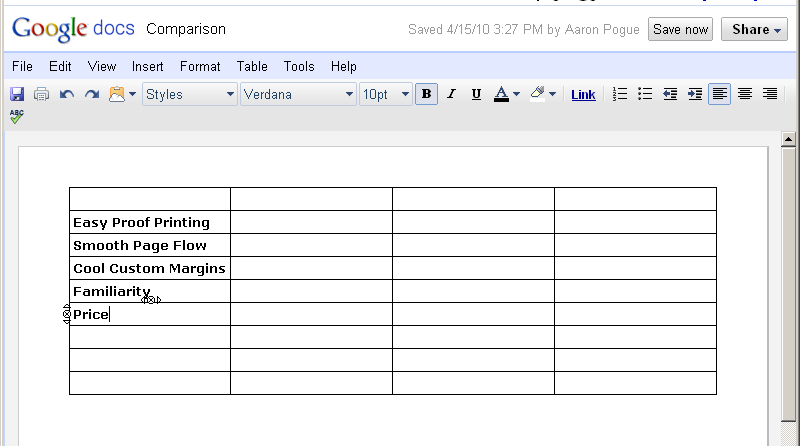
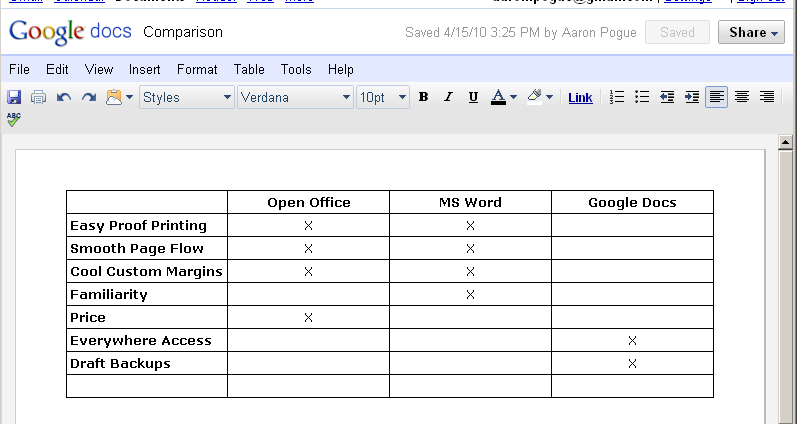
Practice building a table this week. To make it useful, let’s fill it with relevant information. Go back to last week’s post, and look at the major questions I said you should ask yourself about your writing needs. Find the answers to those questions — just the things you need — and put them in a table as the rows (skipping the first row, for headings).

Build a side-by-side comparison chart in your word processor of choice

Then label each of the columns with the name of a writing tool you have access to, or have considered using.

Use an embedded table in your word processor to compare features

Then go down the list, top to bottom, and put Xs everywhere the program lives up to your expectations. If you have to spend a little time researching what an unfamiliar tool can and can’t do, if you have to spend some time digging around in your own writing software to figure out how to implement a useful-sounding feature…all for the better. You’re learning your tools, and anyone will tell you that a craftsman is only as good as his tools.

If you find it at all useful, just wait until you see tomorrow’s post. I’ll have another hundred or so rows for you to add on to the bottom of your table. For now, just do the little one.

Courtney’s Work-in-Progress Update

Courtney Cantrell shares her work in progress

Courtney Cantrell shares her work in progress

Okay, so, ummm…I didn’t keep you as posted on my work-in-progress as I promised I would. I FINISHED MY FIRST DRAFT!!!!! about six weeks ago. I gave a printed copy to my mom, who is a most excellent beta reader, and she called me yesterday to tell me she finished reading and is ready for me to write the second draft so she can read it again. Did I mention she’s a most excellent beta reader?

Looking back at my last update, I realize I left you hanging a little, Gentle Readers. Therefore, to set your minds at ease (’cause I just know this has been keeping you up nights), I shall tell you that I did, in fact, figure out why Rebekah slapped Daniel, and it was connected to a mighty spiffy plot twist, I daresay. But I don’t want you to rest too easy, so I won’t reveal further details now. Cue evil laughter.

Behold! The game is afoot, and The Second Draft loometh ahead, apparently precipitous but in reality more easily ascendable than its predecessor. In this, my most excellent beta reader = Mom = my climbing buddy, having scouted ahead and come back to me with a report of the obstacles and pitfalls I shall face. And so, knowing that forewarned is forearmed, I heft my trusty tools (i.e. Everything I Have Learned And Am Learning About Writing) and plunge ahead, further up and further in, as the Lewisan (Louisan?  C. S. Lewis said it, anyway) saying goes.

Metaphors aside, what follows is my game plan for second drafts.

From First Draft to Second Draft

1. I look through the manuscript and read comments my beta reader has written for me.

2. As I peruse, I add my own comments and editorial marks. I make special note of things the beta reader points out that I haven’t thought of. These things mostly involve holes in the plot or potential directions of character development that I didn’t taken into account. Forest-for-the-trees stuff.

3. When I’m satisfied that the manuscript is as marked-up as it’s gonna get at this stage, I open the original document on my computer and save it in a folder entitled Draft 2. Now I can start working with the document but still preserve the first draft in its original form. I suppose many writers might consider this a superfluous step, but I like to be able to compare drafts and measure them against each other. If nothing else, this shows me that I’m making progress. And “you can’t see where you’re going if you don’t know where you’ve been.” I don’t know who said that, but I find it’s a truth of life in general and a truth of my writing life in particular.

4. Now comes the fun part, the part my fingers have been itching to get to since before I even finished the first draft! This is the part where I get to start editing the manuscript and building my second draft. I know some writers advocate starting with blank pages and re-writing the entire thing at this point. That’s great for them, but I have absolutely no desire or motivation for that much work. Call me a lazy bum, but there you have it. My first draft is my block of marble, in which I’ve carved a recognizable shape. Now is not the time for discarding and starting afresh on a whole new chunk of rock. Now is the time for more carving.

5. I guess I can’t help it with the metaphors.

6. Anyway. I love this stage of the process, because I’m one of those weird people who think editing is fun. As I’ve mentioned before, I love a good challenge–and I can think of few more challenging endeavors than to edit my own work into something good and readable. It’s a challenge to creativity, to objectivity (about myself), and to humility. Increasing these traits within myself makes me a better person. So I’m not just carving away at a metaphorical block of marble…I’m also carving away at me and hopefully letting myself be formed into something more recognizably human.

7. But this is supposed to be about writing second drafts, not about self-improvement.

8. Or is it?

9. I don’t know how long I’ll work on the manuscript before I can declare the second draft finished. On the day that I finished the first draft, I didn’t know I was going to finish until I joined one particular paragraph to the next and YATTA! Draft 1 was complete! That’s how it goes: I don’t know I’m finishing until I finish. It’s always a surprise–which appeals muchly to my sense of whimsy. When something makes me happy like that, I say it “swings my verge”–but the origin of that phrase is another story and shall be told another time.

10. I’ll keep you posted!

Photo credit Julie V. Photography.

The Week in Words (April 17)

Aaron Pogue with a scribblebook (Courtesy Julie at PhoxiePhoto.com)

Some things I've said, and things I've read.

I’m adding a new weekly feature to Unstressed Syllables today, “The Week in Words.” I’ve been toying with the idea for two months, but I’ve had too many huge projects going to commit to anything new.

You’d hardly know that, though, because I haven’t been talking about any of my projects. Why? There was no room for site news in my weekly posting schedule!

That’s what I hope to do here. Talk shop, keep you up-to-date on the latest and greatest that I’ve got going on, and probably throw in some links to articles I think you might be interested, but don’t have the time to write up in a blog post.

So here’s what’s been going on!

At the Editor’s Desk

I’ve got two major new projects that are worth mentioning (not counting the launch of a brand new weekly feature!).

The Girl Who Stayed the Same (Working Title)

I’m joining Justin in the thrilling, terrifying land of serial storytelling. Longtime readers will know it’s not my first foray there, but I feel like this attempt is going far better than my last. Of course, I’m only four scenes into it, so we’ll have to see.

I told you a few weeks ago about the twice-weekly creative writing prompts at the Creative Copy Challenge. I’ve participated in every challenge they’ve posted since then (how’s that for practicing what I preach). As I mentioned back then, there are several different ways people participate in the challenge, whether it’s competing for the Short Form crown, or trying to make quality poetry, or just writing compelling story scenes.

If you clicked on all those links, you’ll know that I’ve taken a stab at each form. Well one of the more popular writers over there has been maintaining a single story all along: “The Ballad of Bayou Billy.” I decided to try that out, too, so I started with Challenge Number 29, and had a stranger walk into a bar. The scene was beautiful (if I do say so myself), and in the space between 29 and 30 I came up with a compelling plot for an exciting new novel.

I’ve decided to write the entire novel, in order, as CCC posts. It will be publicly available if you want to follow it on the challenge, but you’d have to dig through all the CCC comment threads to find each scene. I’ve decided to save you the trouble and add links to my Week in Words post every week. So if you can wait until Saturday, you’ll have two full scenes to read.

Here are my first four:

  • Intro: Jonas — Part 1, 2
  • Chapter 1: The Stranger — Part 1, 2

In the end, it’s going to be a 100,000 word novel in five acts. I plan to package it up all pretty in e-Book form whenever I complete an act (approximately 20,000 words, or 60 pages each), and put them up for sale here. That’s right — after years of speaking out against it, I’m going to see how I can do with self-publishing. I’ll let you know how it goes.

The e-Book Challenge and Unstressed Syllables present
How to Build an e-Book by Aaron Pogue

(Yes, I’m really calling it that.)

And I suppose I should have introduced the e-Book Challenge as a major new project I’m working on, but I’m not really working on that yet. It’s not supposed to launch until August, so I’m cutting myself a little slack. You can expect to hear a lot about it when I do get around to setting up the site and everything, though.

Anyway, you already know about the Pre-Writing Challenge. That event went so well that Carlos decided to expand it into a whole year-long Blog Challenge series (that’s where the e-Book Challenge came from — that one’s going to be mine). He also wanted to put together a Guidebook to the Pre-Writing Challenge so anyone who didn’t get to participate in the first one could learn more about it, and either try it on their own, or get prepared for the one he’s going to be hosting again next February.

Carlos was really excited about making that e-Book, but he didn’t actually know a lot about how. As a Technical Writer, I spend eight hours a day working on “how.” It’s what I do. So I decided to put together some simple instructions for him, and then I thought, “Hey, that would work a lot better if he had some examples he could look at!” and then I thought, “Hey, why not write an e-Book?”

And so I did. Three weeks and a whim, and I churned out a massive three-volume, high quality e-Book. How’s that for being an authority on the topic? Wouldn’t you like to be able to do that, too? You can, for the low, low price of….

No. This isn’t a sales pitch. (Not yet, anyway.) Just wanted to let you know what I’d been working on. I finished the rough draft last night, and I’ve got it out to some test readers for feedback. I’m going to spend the next couple weeks trying to get a sales page set up (so please excuse any weirdnesses you see on the site in that time).

The book should go live for sale on May 1. I plan to make a big launch of it, so you can expect me to talk about it a lot between now and then. I don’t intend to manipulate anyone into buying it, though. It’s a solid product with a huge market, so I don’t need to trick my friends and family into buying it if they don’t need it.

If you’re interested in monetizing a blog with an e-Book, but you need some help knowing where to start and how to make it beautiful, check out my sales page (once it’s up). If not, you can just skip over my discussion of it. Simple as that.

On Unstressed Syllables

For SEO reasons, it’s said to be a good idea to post a weekly review of your own blog posts. If you don’t know what SEO is, wait a couple weeks. It’s on the agenda.

If you wake up every weekday and check Unstressed Syllables before you even get your coffee, you can skip this section altogether. You should post a comment letting me know you do that, though, so I can go faint in my shock. How cool would that be?

Anyway, it’s been a busy week, so in case you missed it, here’s what happened! I started with a Technical Writing exercise asking you to share the logic behind your blog posting schedule. That was really just a thinly-veiled attempt to get you to actually finish your blog posting schedule. Nobody has commented yet. I’m so disappointed. I thought surely someone would do the assignment. Mom? Anybody?

(Yes, I’ve just decided I’m going to use The Week in Words as a huge weekly guilt trip for everyone who skips the writing exercises. It’s going to be awesome.)

Tuesday’s Technical Writing article introduced a two-part series on how to choose the right program for your writing. I discussed the many different tools I use (and why), and the two biggest deciding factors for me: fancy printed pages, and everywhere accessibility.

On Wednesday, Courtney dove head-first into an eight-month-old manufactured controversy over Claire Bennet’s lesbian turn on Heroes, but she had a much better argument than I’ve seen before: it’s out of character. Courtney gave us an excellent reminder about the importance of believable character development, and showed off her lovely new profile picture while she was at it.

Thursday’s Creative Writing article explored the purpose and benefits of an Ideal Reader as a creative writing tool. When you write to a finely targeted audience, you open yourself up to make powerful connections with your readers, and develop a unique artistic style that will help you stand out from the boring crowd. So do it.

We wrapped up Friday with a Creative Writing exercise that asked you to perform a market analysis on your work-in-progress, sharing exactly who it is you’re writing to and what they expect out of a story. Nobody’s responded to that one yet, either, but it’s barely been twenty-four hours. Get something up before next Friday, and I won’t call you out. Promise.

Then on Saturday I launched a new weekly site review feature called…oh.

Across the Web

I figure this will end up being one of the more valuable sections of the Week in Words, because I’ll be able to drop links in all week long, whenever I stumble across one, and then just write a short description of each when Saturday rolls around.

This being the first Week in Words, I haven’t actually been doing that. Sorry. So here’s the three relevant articles I remember, and whose links I can find. Just be glad you get anything!

And that’s the Week in Words. Next week’s should be a lot shorter, unless I take on two or three more major projects between now and then. Of course, that’s a very real possibility. So maybe you should just go ahead and start blocking out time on your Saturday morning schedule now. I’m sure I’m worth it.

Photo credit Julie V. Photography.