Skip to content

WIHTLAWriTWe…from You

Acronyms are fun. Coming up with acronyms is fun. Screwing around with acronyms is fun, too. That’s why I decided to do it again today. Tee hee.

But before I get into interpreting the new acronym in this article’s title (and I do hope you noticed that it’s new), allow me to ruminate a bit upon the purpose of said article — and of every other article on WILAWriTWe.

When Aaron first asked me to join Unstressed Syllables with a weekly column, he gave me free rein to write pretty much whatever I wanted to, as long as my ramblings related to writing. (I mean, I could regale you with my adventures in the wonderful world of crochet, but you might think that doesn’t really fit a writing blog.)

The column was to appear weekly, but I needn’t confine my musings to lessons gleaned from a mere seven-day. After all, none could guarantee I would learn a brand-shiny-new writing lesson every single week — so if I were to write a weekly column, I must needs expand my subject matter base.

So that’s what I’ve done. Over the last eight months, I shared with you, dear readers, various and sundry tales of how and where I’ve acquired scribbling wisdom and then tried applying it. Your feedback in comments and in person has let me know that I’ve been somewhat successful in communicating to you my woes and triumphs. I know we writers are supposed to be good with words and all, but I truly can’t tell you how encouraging it is to know that I’ve touched lives with the words I have managed to write.

This week, dearest inklings, I’m hoping you’ll be kind enough to return the favor. What I Hope To Learn About Writing This Week (aha!) is whatever you might like to share with me and with your fellow readers.

That’s right! It’s your turn! Get into the commenting action and treat us to a writing tidbit you’ve picked up recently. Tell us the tale of writing battles past, whether you fought and won or fought and learned. Or, if you have no particular storying story to tell, let me know what I’ve missed so far in weekly WILAWriTWes. What writing points would you like to see me cover? What writing conundrum have I failed to mention? What’s the circumference of the earth at the equator, and what does it have to do with the price of eggs?

The floor is yours, dear inklings. Let the holding forth begin!

(And that’s WIHTLAWriTWe.) 🙂

On Text Editing: How to Modify HTML and CSS in EditPad Pro

Yesterday I took some time to try to tell you what’s so great about the humble text editor. Or, more to the point, what it has to offer us as writers.

There’s a trick I mentioned in passing, and I feel like I should bring it up again just to make sure you pick up on it. When you’re trying to copy some highly formatted text (like something you found on a website) into a different program that won’t support the original formatting, one of the easiest ways to “clean it up” is to copy the text into a text editor (and for this, even Microsoft’s Notepad will do).

As soon as you paste the text into a text editor, it should lose all formatting. That can be a bad thing, but it puts you back in control. I’ll often do this if, for instance, I’m trying to copy something from Google Wave over to WordPress, and I want the words but not the styling.

Note:

For short bits of text you can achieve the same effect by copying them into any handy text entry box that doesn’t allow formatting, like the Update box on Facebook or Twitter (which I almost always have open), or just the address bar of your web browser.

Today’s article isn’t really about little workarounds like that, though. It’s about the programming work we’ve all got to do from time to time, and it’s focusing on fancier text editors than Notepad.

The Software

Some popular (and free) examples of that sort of editor include Notepad++ (or, if you’re really going to try to learn Python, Komodo Edit), but my favorite by far for simplicity and power is EditPad Pro.

EditPad Pro isn’t technically a free product, but they provide a hassle-free evaluation version that you can use for anything you might need as a writer, and you can run the evaluation version for as long as you want. I eventually paid to get a full copy, but only because I wanted to support the product. I never once found the evaluation version to be limiting.

Anyway, once you’ve chosen your text editor and installed it, you can open an existing text-based document, or create a new one. Most of them will even let you use a built-in FTP client to open a remote file (such as a CSS file or a static page on your website) and edit it directly.

To do that in EditPad Pro, you would go to View | FTP Panel (Ctrl + 10) and then click the little green connection icon on the panel to set up a new connection.

After you provide your username and password, the FTP Panel on the left will show a list of folders and files on the FTP site, and you can browse to find any of them you want to modify. Whenever you save your changes, they’ll automatically get applied to the copy of the file residing on the FTP site.

Nesting with Tabs

Programming mostly happens in “blocks,” chunks of text nested within other chunks of text. HTML and CSS are no exception. You’re familiar with the anchor block — an <a href=”https://unstressedsyllables.com”> tag opening the link and </a> closing it, nested within the middle of a body paragraph.

If you’ve ever looked closely at a page’s full HTML source, you know that there’s even more nesting going on than that. There’s an <html> block that encompasses the whole thing, and then a <head> block inside that, with stylesheet and font links nested inside it. Then comes the <body> block, which is the one that contains those body paragraphs I mentioned, but even those are probably nested in a bunch of <div>s.

To keep track of all this nesting, and know exactly where a bit of text is relative to others, programmers traditionally use tabs, indenting each new nested item one level farther in than its parent. For HTML, that might look like this:

Advanced text editors make it easy to manage that sort of indenting. To do that, they keep track of what level you’re working on, so if you’re writing a line that is indented 5 tabs from the left and you hit Enter, EditPad Pro will automatically start a new line that’s already indented 5 tabs. If you want to start a new nested block, just hit Tab again (moving it over 6), and then it’ll keep you working at 6 tabs until you move back out (with Shift-Tab or just a plain old Backspace).

You can also select a bunch of rows, and use Tab or Shift-Tab to move them in or out as a group.

Regular Expressions

I also mentioned yesterday that advanced text editors like EditPad Pro support fancy search and replace using a system called “regular expressions” (or often “RegEx” for short). It would take me pages and pages to teach you everything you need to know about RegEx, but the single most important expression you need to know is this:

.*?

That’s dot-asterisk-question-mark, and when you stick them together in a RegEx search, they mean, “Keep including everything you find up until the next match. So, for example, I might do a search for something like this:

<.*?>

Which will search until it finds an open bracket (<),  and then select everything from that open bracket up until the next closing  bracket it finds (>). If you can’t immediately guess how that would be useful, glance up at the image above and think about editing HTML.
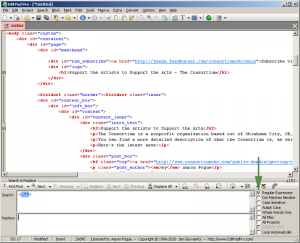
If I do a search and replace with nothing in the replace field (essentially a search and remove), I get left with plain text.
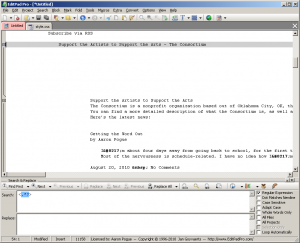
If you really learn regular expressions (or just figure out the right keywords to search for), you can do a couple quick replaces to clean up all the extra blank lines in that image, and replace all the HTML tokens (like &nbsp;) with their plaintext equivalents. You can also do fancy things like converting all the “2010-08-##” date codes to say “August ##, 2010,” or change 10-digit phone codes to set the area code in parentheses and separate the prefix with a dash.

A World of Applications

Once you learn these tools, putting them to use is just a matter of stretching your imagination — well, that and just remembering you have them at all. If you’re a blogger, I know you’re working in HTML from time to time, and you need to learn how to modify CSS.

Those same languages become critical if you’re trying to get the most out of Google Docs, which allows you to directly edit the HTML of your stored documents, and lets you style documents and templates using CSS. I’ve discussed that before, and I’m going to talk about it again, but the piece that was missing was the editor.

Google Docs has its own text editor for the HTML and CSS, but whenever I’m working with either of them, I tend to copy them out to EditPad Pro to make my changes. It’s worth it just for regular tab nesting (in a web browser, pressing Tab will just move you out of the editor frame), but I find the syntax coloring incredibly helpful.

What about you? How could you use a text editor in your writing projects? If you can think of something I haven’t mentioned, add it in the comments.

And if you really don’t think it would ever be useful in your situation…feel free to challenge me. Let me know your situation, and I’ll let you know what you could use it for. You’ll be surprised.


On Text Editing: Getting to Know Your Notepad

I started this series with a story about the time I color-coded myself, and some poetic language about the value of color-coding in a text editor. I also mentioned “Notepad” as a text editor, but that was probably unnecessarily misleading.

I’m not talking about Microsoft’s built-in Notepad tool, here. I’m not even talking about Wordpad, which can handle bigger documents. I’m talking about advanced text editors — generally designed for use by programmers — that offer a handful of critical editing tools. For our purposes, the most important are syntax coloring, and powerful search and replace features.

Syntax Coloring

I mentioned syntax coloring, describing it as a dynamic software tool that tries to track what you’re doing in a text document and displaying that to you in a visual way. As a rough example, it might notice when you open a pair of parentheses “(” and use some sort of symbol or color code to remind you that you haven’t closed it.

In practice…well, it depends on the file type. As I said, these features are intended mainly for programmers working with code, but we’ve got to work with code too — HTML and CSS even if we’re not learning Python and writing macros in VBA.

HTML uses tags like <a href=”https://unstressedsyllables.com”>this</a> and <em>this</em> buried in the middle of a bunch of words to do what it does. Syntax coloring picks up those tags and makes them a lot easier to see within the block of text.

Here’s an example of what that same paragraph would look like in my favorite text editor:

HTML uses tags like <a href=“https://unstressedsyllables.com”>this</a> and <em>this</em> buried in the middle of a bunch of words to do what it does. Syntax coloring picks up those tags and makes them a lot easier to see within the block of text.

The coloring makes the special code stand out from the text it’s embedded in so you can more easily edit it. Whether you’re looking to change the words around the HTML tag, or the URL within it, the syntax coloring makes it easy to make sure you’ve got your cursor in the right spot.

Search and Replace

On top of that, a good text editor — like a good word processor — makes it easy to search large documents for key phrases and replace them either one a time (when you need to verify each instance) or all at a single click. Word processors can be fickle with their search or limited in their options, though, and their biggest strength can also be a pretty big weakness: word processors try to do your work for you.

That means sometimes they’ll interpret your instructions in a way you don’t want. More often, they’ll add extra formatting you don’t really need, so a lot of times you’ll be working with some text in WordPress or some other environment, and copy it into Word just do a Find-and-Replace, and end up with curly quotes and other symbols inserted and your spaces all messed up and inexplicable tables where you wanted blocks of text.

By contrast, the strength of text editors is in their simplicity. If you copy and paste something into a text editor, all you’re going to get is the text. You’ll lose your italics (which can be a big problem), but you’ll also lose whatever phantom code it is that’s giving you extra space between paragraphs or making all your body text 9.43-point Courier no matter how many times you tell it to be Times New Roman.

On top of that, appealing to the programmers again, advanced text editors tend to add Regular Expression support to their search and replace tool. If you’re familiar with wildcards in Word, you’ll know how handy it can be sometimes to search for a pattern instead of just a fix set of characters or words.

Regular expressions are like search wildcards on steroids. It’s essentially a programming language of its own, dedicated just to search and replace functionality. With a good regular expression it’s pretty easy (just as an examples) to copy a page full of HTML source code, and do one search and replace that strips out all of the HTML tags altogether, leaving you with nothing but the actual text of the page.

How to Modify HTML and CSS in EditPad Pro

If you’ve ever dabbled in any of this stuff, I’m sure some of the things I’ve mentioned above have left you drooling. It’s impossible to tell you how to do them, though, without focusing on a specific piece of software.

So that’s what I’ll do. I’ll name a handful of programs I’ve experimented with or heard recommended, but I’m going to get into details on how to do these things with my personal favorite. So come back tomorrow for a tutorial on text editing with EditPad Pro.

On Text Editing: My Colors

I grew up surrounded by books. Despite my mom’s best efforts to find room for critical necessities like furniture and open doorways, my dad has managed to pack an amazing number of books into every livingspace he’s ever called home. For eighteen years, those included mine.

And for many of those years, I considered his collections my personal library. Unlike so many readers I know, I never really developed a deep love for the public library, because I never needed to. I got the same benefits from a quick trip to the dining room.

Anyway, one of his books that caught my eye back in high school was Roger Zelazny’s The Chronicles of Amber. When I asked him about it, he said, “It’s weird. You can read it if you want to — you’ll probably even like it, because you like things that are weird. But it’s weird.”

In fact, it was a deeply post-modern character-driven urban fantasy. (In other words, it would be amazingly popular if it were written and published in today’s market.) Among its charms was a cast of incredibly vivid characters, on the order of superheroes, caught up in a high-stakes game of politics.

Zelazny did an amazing job of branding these characters, giving them powerful personalities that were easy to recognize. Among other things, he gave each of the major characters a fixed color palette, reflected in their coats of arms, their portraiture, their upholstery choices, and — most prominently — all the clothes in their wardrobes.

It wasn’t a subtle device, either. The protagonist pointed it out bluntly halfway through the book. As a writer, I immediately filed it away as a fancy way of differentiating the vast array of characters he wanted his readers to keep up with…but the idea also appealed to me on a personal level. I liked the idea of crafting an image, a visual symbolism to represent me wherever I went.

And, being a teenager, radical expression of style just came perfectly naturally to me. I chose black, gray, and green as my official colors. I stopped wearing some of my favorite clothes if they didn’t match my new color scheme, I went shopping for new stuff as often as I could afford it, and over the course of about three months I completely swapped out my wardrobe. I took on a color scheme as though it was a persona, and I never looked back.

Well…not for fifteen years, anyway. A few months ago Julie and Carlos came to visit us, and Julie (who’s known me since way back in those high school days) walked into the living room and the first words out of her mouth were, “Ooh, look at you in a blue shirt.”

Carlos, lugging the luggage, followed far enough behind her that it was a complete coincidence when he caught sight of me, frowned, and said, “What are you wearing?”

As it happens, I told Trish a couple years ago that I was ready to diversify my wardrobe. I promised I’d wear anything she picked out for me (although I did ask her to keep it to solid colors or pretty simple patterns). In all that time, she’s only picked two shirts for me outside my color scheme.

I explained all that them, and Carlos wrinkled his nose and said, “I dunno, man. It’s just weird.”

Julie nodded, completely serious, and said, “You don’t look like you in blue.”

Honestly, radical expressions of style were never really my thing. I spent five years wanting to get an earring but unconvinced that I could “pull it off.” I never hesitated with the colors, though, and they served me well during some years when I needed something external to define who I was and what I was all about.

Getting to Know Your Notepad

It’s amazing how powerful colors can be as symbolic objects. We’ve all used colored highlighters to mark up text, flagging key ideas in distinct ways. Most word processors provide a vast array of color choices in their highlighter tools for the same purpose.

Programmers, too, frequently use color coding to keep track of everything “going on” in a given bit of text. They use a software feature called “syntax coloring” which automatically color-codes text on the screen as it’s typed, and it’s incredibly helpful for writing, reviewing, and editing code.

And, as I’ve pointed out several times over the last few months, technical writing tasks leave us wrestling with code more often than we’d like, and they often respond well to a little understanding of programming. So, for several reasons, I want to talk to you this week about one of the most powerful programming tools for a Tech Writer: Notepad.

No, really. Depending on the task, there are definitely times when a robust text editor can do more for you, faster, than a big bells-and-whistles word processor. Stick around, and I’ll tell you how.

On Writing Rules: How to Build Suspense the Right Way

As Stephen King and Edgar Allan Poe have both toiled to teach us, suspense in storytelling mostly comes from the things you don’t say. However, as I pointed out yesterday, every storyteller has a stern obligation to provide readers with everything they need to know to understand what’s going on.

Walking the thin line between those two goals can be tricky.

Creating Concern

Good suspense doesn’t need to come from a surprise, though. Often it’s not a matter of concealing from your readers what’s going to happen, but of hinting to them what will happen.

For that to work, though, you’ve got to create compelling characters. If you can do that, if you can make characters that your readers connect with emotionally, then the simple promise of bad things to come — bad things, incidentally, that you absolutely need to make your story work — is enough to keep your audience on the edges of their seats.

They may don’t have to wonder what’s in store, or what’s lurking around the corner. If your characters are dear enough, all you have to do is spell it out clearly, and let your readers wonder just how your protagonist is going to survive.

Laying Foundations

In fact…yesterday I spent a few hundred words telling you not to withhold information, but the real key to good suspense is in the information you provide. You’ve got to build characters for your readers to care about, and you’ve got to build scenes that evoke that concern.

The easiest way to do that is with foreshadowing. Know where your story is headed, know what’s really going to scare your protagonist (or, if he’s enough of a battle-hardened soul, what would scare his mama if she knew he was caught up in it), and start dropping hints.

You’ve always wanted to do some good foreshadowing anyway, haven’t you? Well here’s your chance. Interrupt the daytime television while your hero’s sitting at the cafe with a news report about shark attacks in the bay, and let your protagonist-slash-marine-biologist-slash-professional-scuba-diver comment that she’s always had a mortal fear of sharks.

Your readers will get the hint.

Two chapters later, when she’s out swimming, mention a splash that catches her attention, but she can’t quite identify what caused it. Give her a bump in the dark, alone, underwater. Maybe let her drop her flashlight….

The information you give is the information your readers care about. They want the story you’re willing to tell…not the one you’re trying to keep to yourself.

Building to a Crescendo (Creative Writing Exercise)

It’s been a while since I assigned a proper creative writing exercise, but this week you get one. If there are any creative writers still reading this…consider today’s exercise a challenge.

I want you to write a scene. I want you to create and convey a character in just a handful of paragraphs, and make me care. Focus on saying as much as you can, quickly, to build emotion from nothing but words.

After a couple full articles on the proper way to create suspense, it should be a simple matter to write a gripping page or three. In fact…maybe too easy.

So, to spice things up a bit, let’s start with an unlikely setting. Your protagonist is at the park, with a couple of close friends…maybe even a dog. It’s bright and warm, with nary a cloud in sight. Now make that scary, and do it in 900 words or less.

On Writing Rules: Creating Suspense without Your Abusing Readers

Yesterday I told the story of a math teacher who kept me in suspense, and ultimately spared me the nightmare of taking more math classes. I also talked about how little I liked math in the first place because it was just a set of soulless rules.

And then I promised you another creative writing series on the rules of writing.

Information Withheld

The core writing rules don’t shape your story, though. They shape your storytelling, but only in good ways.

One of those rules is that, as the narrator, you need to give the reader everything they need to know before they need to know it. There was a strong element of that rule in our discussion of premise, but it shows up way more often than that.

When you first participate in a creative writing workshop or a critique group, this is going to be one of the criticisms you’ll hear:

I feel like you hid this information from me just so you could make a dramatic revelation.

The first time someone told me that, I said, “Well, duh!” Isn’t that how it’s supposed to go? Isn’t there an entire genre of literature dedicated to that technique?

I spent years studying the craft of writing and pondering that question before I ever figured it out.

Need to Know

In the end, though, it’s a pretty simple distinction. There’s a difference between building suspense and withholding information. For the most part, the distinction is between a “gimmick” (which will draw criticism in your critique group every time) and a genuine story element.

If you want a quick and easy rule of thumb, you can just ask yourself this every time you deliberately surprise your reader:

“Does this reveal add to the story?”

You’re only allowed to say yes if it advances the plot or clarifies characters and motivations. If you’re doing it just to create a dramatic experience for the reader, you’re doing it wrong.

I’ve made a big deal about these rules protecting the dignity of your readers, but if you followed the comments last time, you might have noticed another aspect I mentioned when chatting with Liz. Writing rules protect your credibility.

As they read your story, your readers are trusting you to tell them everything they need to know. Every time you violate that trust, you lose part of your authority with that reader, and that’s an awfully big price to pay just to get yourself an “Aha!” moment.

Good Suspense

That’s not to say you can’t surprise your reader. I shared a link about that in those same comments, but don’t go look for it now! I’m going to talk about it in more detail tomorrow.

I wouldn’t call myself a master of suspense, but I’ve listened to a few of them share their secrets, and I can at least point you in the right direction. So come back tomorrow and I’ll tell you how to build suspense the right way.

On Writing Rules: Waiting

Not too long ago, I unleashed some pretty harsh words on math. (If you don’t feel like following the link, the harsh words were “dang you.”)

I didn’t excel at math in high school — not because I  didn’t get it, but because I didn’t care. With the strange exception of factoring polynomials, I was able to understand and implement every principle I encountered.

It felt dry and boring to me, though. What’s the point in taking a test where the best you can possibly do is find the same answer everyone else found, and for the same reasons?

No thank you! Give me an essay test over that any day.

Ahem! Anyway, that line of reasoning didn’t serve me too well when it became necessary on any given weekend to set aside some of my precious free time to work my way mechanically through a bunch of homework exercises. Instead, I’d do the two or three I needed to “figure it out,” and then stop.

That didn’t make for great grades, but what did I care about my math grades? I was going to college for an English degree, right? When it came to math, I just needed to pass.

So it was that, during my junior year in high school, I was taking Pre-Calc/Trigonometry and cruising along at a low C with the happy knowledge that this was the last required math course I’d have to take in high school. I’d need three hours on the college level, just for Gen Eds, but at least I’d get a year off in between.

Then one day halfway through the second semester, Mrs. Boehringer started the class with an announcement. “We’ve made an arrangement with Wichita State University,” she said, “so anyone who receives at least a B in this course can choose to take the WSU final instead of my final, and get college credit for Freshman Math based on their grade on the exam.”

And just like that, everything changed. I had a reason to care. If I could take that test and pass it, I could never take a math class again. I’ve never in my life worked so hard to get a B.

I only barely made it, too. Starting so late in the year it was a Herculean tasks to raise my average that much. I did it, though — I even went a hair over. The final would be worth 10% of my grade, though, so a bad enough score on it would undo all those weeks of hard work.

Appropriately enough, everything turned on a single number. The final was worth 100 points. If I got 60 points, I’d have a B on my transcript, three more hours of pre-college college credit, and I could be done with math forever.

If I got 59 points, I had a C in this class…and that was all.

So I studied. You know I studied. I practiced, I showed up early, I focused, and I showed every jot and tiddle of my work.

Only five of us even tried for the college credit, so she agreed to grade the tests for us right there on the spot. I was the last one to finish — checking and rechecking my work until the last minute. I’ll never forget that last minute.

The room was empty but for the teacher and me when an egg timer went off on her desk, and I rose and gathered my things. I brought her my papers, and watched from across her desk as she flipped through them, checking my work.

She scored each question. When she reached the end, she flipped back through totaling all the pages, then copied those totals to the front of the test and began adding them up.

It was the most nervous I’ve been about an addition problem since second grade.

She scribbled a 9 in the ones place, tallied the tens in a flash and scratched a 5 next to the 9. My heart plummeted.

Without moving her head, she cast her eyes up at me — hovering there over her. We had never had a terribly friendly relationship, and she had to know exactly how much I had riding on that grade.

If she’d been an English teacher, I would have argued for an extra point here or there (although, of course, I wouldn’t have needed to). It didn’t make any sense here, though. Math was math. If I’d gotten it wrong, I’d gotten it wrong. There, in two digits, was my fixed destiny. Much more miserable math….

I watched her eyes go back to the score on the page, and then flash up to me again. I watched her mouth curl in distaste, heard her irritated sigh, and then she marked out my grade and added one more point.

Without meeting my eyes, she jerked her head toward the door and said gruffly, “Get out!”

Building Suspense without Abusing Your Readers

I started a couple weeks ago talking about the rules of writing, and the importance of respecting your readers, and that series started a real conversation. This week I want to address those principles again as they apply to the topic of suspense.

That’s a trick a lot of new writers get wrong…and never know why. Come back tomorrow and I’ll tell you how to create suspense without abusing your readers.

What I Learned about Writing this Week…from Stephen King, Redux

Greetings, fair and gentle readers! Some months ago, if you recall (or even if you don’t), I shared with you my inspirations after reading Stephen King’s Blaze. In that article, I mentioned in passing his how-to book On Writing — A Memoir of the Craft. Today, we’re going to delve deeper than “in passing.” Today, we’re gonna stop and take a close look.

Biblical Proportions

Those of you who know me in person have probably heard me refer to King’s book as my “writer’s bible.” I say it tongue-in-cheek, but, as my dad always used to tell me, in every joke is embedded a kernel of truth. Of all the books I’ve read about the craft of writing, King’s book has so far struck me as the most insightful and inspiring. He goes further than presenting nuts and bolts: He delivers his writing experience and advice as a narrative, which lets the reader (i.e. the student writer) see the big, epic picture of what this craft is all about.

I won’t limit myself — or you, dear inklings — by claiming that King’s book is the definitive end-all-be-all of writing manuals. But it’s certainly the most entertaining one I’ve ever read, and it fell into my hands once-upon-a-time when I needed exactly King’s approach and advice. His lessons have stayed with me ever since that first reading, and I refer back to them at least mentally, if not by taking the book to hand, every time I sit down to write.

The Importance of Being Messy

If writing is a craft, as King says, then we writers are craftsmen. And, as we all know, a craftsman must have a toolbox. If we go at writing with nothing but our fingers, we might have a glorious time getting our hands dirty, but we probably won’t accomplish a whole lot. At most, we might end up with a gloppy mess of a story.

And yes, I can hear some of you saying, “But a story is a story, right? And haven’t you told us to have at it with gusto, throw caution to the wind, laugh in the face of danger, and write with devil-may-care abandon?”

All good points, you sweet, smart-alecky naysayers. I have said those things, and I do stand by them. Above all, the first draft of a story is meant to be an icky, gloopy mess. And when you’ve completed it, you do, indeed, have an honest-to-gobstoppers jen-yoo-ine story on your hands.

But. You still need to shape that amorphous blob of words into something approachable, not to mention digestible, for anyone else. And that is where your toolbox comes in.

Top o’ the Toolbox, Gov’nah!

Toolboxes contain layers of nifty tray thingies you can lift out and rummage around in. What fun! And according to Mr. King, that topmost tray thingy contains the most basic of writing tools: your vocabulary. As we discovered a few weeks ago, my dear inklings, your words matter, and you would do well to choose them wisely. King’s assertion concerning words is that you would also do well to use the words you already have.

Well duh, you might say. How could one use words if one doesn’t have them already? King’s point is that we shouldn’t go looking for highfalutin’ words to bolster our writing, thinking that it doesn’t sound intellectual or frilly enough. Instead, we need to stick with what we’ve got; the KISS principle should guide our word choices.

King provides examples of some well-known authors who use simpler vocabularies:

He came to the river. The river was there.
–Ernest Hemingway, Big Two-Hearted River

Some of the owner men were kind because they hated what they had to do, and some of them were angry because they hated to be cruel, and some of them were cold because they had long ago found that one could not be an owner unless one were cold.
–John Steinbeck, The Grapes of Wrath

This is what happened.
–Douglas Fairbairn, Shoot

King points out the Steinbeck quote in particular, because it is a fifty-word sentence in which none of the words contain more than two syllables. I would issue you the challenge, dear readers, to write a piece (of indeterminate length) made up of nothing but one- and two-syllable words — except that I would have to take on that challenge myself, and I’m honestly not sure I’m up to it!

Let’s Not Embarrass Ourselves

King writes,

Put your vocabulary on the top shelf of your toolbox, and don’t make any conscious effort to improve it. (You’ll be doing that as you read, of course…but that comes later.) One of the really bad things you can do to your writing is to dress up the vocabulary, looking for long words because you’re maybe a little bit ashamed of your short ones. This is like dressing up a household pet in evening clothes. The pet is embarrassed and the person who committed this act of premeditated cuteness should be even more embarrassed. Make yourself a solemn promise right now that you’ll never use “emolument” when you mean “tip”…

My interpretation of that: We should eschew obfuscation whenever possible, by which I mean…

…keep it simple. And that’s WILAWriTWe!

(Click the On Writing link above, buy anything within the same browser session, and I might get some money out of it. Simple enough, ain’t it?)

Photo credit Julie V. Photography.

On Getting Better: How to Write in the Deep End

So…a conversation that started out with my gross negligence as a father has now become an essay on expertise. I guess I’m telling you to fake it ’til you make it.

The sentiment has been much on my mind recently, as I just finished reading No Plot, No Problem, the NaNoWriMo handbook. It’s heavy on the pep talk, and pretty unflinching in its assertion that you’re not qualified to write a good novel. It’s just Mr. Baty’s opinion that you should do it anyway.

With Exuberance

Chris calls it exuberant incompetence. He suggests you embrace the fact that it sucks and just make something fun. There’s a place for that advice (a place called November), but it’s not really what I’m talking about here.

Going back to our metaphor, Annabelle wasn’t incompetent as an underwater swimmer. She thought she was, but between the things she knew, the resources she had, and the helping hands ready to spring to her aid, she never really had a chance of failure.

My advice to you isn’t to do things you’re incompetent at, but to stretch the competence you do have and turn it into real expertise.

With Desperation

That sort of stretching is frighting. I admitted that yesterday. But as I often say, “If you’re not gripped with an abject, mortal terror, you’re not really trying.”

Honestly, it’s hard to really pursue self-improvement in any kind of casual way. If you want to make real progress, you need real motivation…and nothing can get you moving quite like a little deep-down fear.

So overcommit. Dive in deep. Sell yourself as a master when you’re really more of a student, because the people doing the buying are nothing but noobs. They won’t know the difference! Sure, you don’t know everything there is to know about the field, but if you’re remotely competent you pr0bably know much more about it than your clients do.

And let me share a secret with you:

No one knows everything there is to know about the field.

The experts are the ones who jump in and then start doing what they know (and figuring out what they need to know) instead of panicking and floundering.

I touched on that months ago when I tried to explain how to style a Google Docs template. The answer is simply, “With CSS.” But that just raises the question, “How do I do CSS?” And the answer to that one, as I said, was Google.

The same goes for programming in Python, or building a business plan, or grant writing. You don’t have to know how to do it! You have to know how to use Google, and then you have to try.

With Style (Technical Writing Exercise)

The lovely Kelley, writing at a coffee shopWhile you’re trying, while you’re researching how other people have done things, don’t be afraid to bring your competence to bear. You won’t know everything, but there will be times in any project when you wander back into familiar territory.

When that happens, seize the moment. Flex your muscles and make it yours. That will help you sell your service, stamping your own personal brand on every project, but more than that, it’ll give you a sense of ownership.

That’s important, whenever you’re stretching, because the goal is to learn to swim, right? The goal is to be able to do this, whatevergt his is, without the fear. And the only way to get there is to fold every experience along the way — success or failure — into your own portfolio.

Annabelle came out of the water howling and wailing. It wasn’t a successful submersion. It only took her moments to declare it her own, though. As soon as she cried, “That was fun!” she started imagining all the new things this experience would let her do.

So what about you? What’s holding you back? Where are you treading water? What could you gain from taking a plunge?

And if you’re already in over your head…congratulations. What has it gained you, and what has it really cost? And what are the new opportunities you’re already dreaming of?

Tell us in the comments. With the responses this series has already gotten, I’m dying to know your story.

On Getting Better: Writing in the Deep End

Yesterday I told a story about throwing my daughter into the deep end of the pool. It wasn’t intentional, but it was astonishingly effective.

Funny enough, I’d been thinking about that metaphor a lot lately. In the last year I’ve been thrown into the deep end at work, building incredibly challenging documents on impossible deadlines with a remarkable consistency.

Throwing Yourself In

I’ve also thrown myself into the deep end in quite a few ways over the last year:

  • Pretending to be a university professor
  • Pretending to be a professional blogger
  • Pretending to be a freelance editor
  • Pretending to be an entrepreneur
  • Pretending to be a manager
  • Pretending to be a writing coach
  • Pretending to be a grant writer
  • Pretending to be a ghost writer

The list goes on, and every item on it has been terrifying. It’s often overwhelming, but time and time again I’ve found myself learning the same thing Annabelle learned in the pool: if you just keep doing what you know how to do, just keep trying, it’s possible to find your way back to the top.

Finding Your Depth

This really goes back to the same issue Courtney raised in a recent WILAWriTWe. I hate to seem like I’m picking on her, but I want to refute yet again her claim that she’s not an expert.

I know exactly why she said that, and I know every one of us feels very inexpert whenever other people first start looking to us for advice. It’s a sentiment founded on fear — fear we’ll find ourselves trapped in a situation we can’t get out of. And, just like Annabelle’s fear of going under water, it’s a fear that keeps us from doing things we want to do.

In the last year, I’ve spent an astonishing amount of time in abject terror. I’ve also made unbelievable progress on half a dozen major life goals, and discovered a wealth of incredible new opportunities that promise an amazing future. Even in the midst of the fear, I find myself happier now than I have been for most of my life.

I can do things now that I couldn’t do back when I thought I couldn’t do them — and that’s only true because I tried to do them anyway.

Learning to Swim

Honestly, this isn’t a message about writing. It’s a message about expertise and confidence, but it’s mainly a message about learning by doing, and Unstressed Syllables runs on learning by doing.

In fact, that’s why I make such an effort to stress the “unstressed” part of Unstressed Syllables. I want to help you get over your fear and maybe make the big unknown seem a little more familiar. I want to give you the confidence to jump in.

Without that confidence, nothing I say here is going to do you much good. Last week’s advice that you try out programming in Python was a big terrifying suggestion that you do something you’re not remotely qualified for. Do it anyway! Even if you don’t end up adding a line to your resume, you’ll learn something. That’s worth doing.

How to Write in the Deep End

The same goes for my writing advice, too. All the things I have to say about document templates, audience analysis, and story structure are just so many words until you actually put them into practice.

Practice makes perfect. It doesn’t matter too much where you’re starting from, so long as you start. Come back tomorrow for some tips on applying this stuff to your writing tasks.