I’ve introduced Courtney Cantrell to you as an amazing writer, and my good friend. She’s been “my good friend” for less than a year, though. We went to the same university, pursued the same degree, even attended some of the same classes together — and all of that nearly a decade ago. We’ve also attended church together for years, and we have mutual friends all around the globe. For all that time I’ve known of her, but none of those things we had in common was enough to really get us talking.
What finally did the job, appropriately enough, was a blog.
I don’t make a lot of new friends — my roster’s already full with the best of them — but when I heard rumors that I was destined to end up in a writing group with this girl, I realized (again in spite of all those things I listed above) that I didn’t really know anything about her. So I determined to find out what I could. I use research as a self-defense mechanism.
What I found was a writer — a full-time novelist with a remarkable insight and an addictive voice. I found out she was a painter, too. And a missionary. I dug through all her archives, crawling years and years back into her life, and found myself cheering her victories and grieving her tragedies. In fact, entirely unexpectedly, I found myself friends with her — and she still knew little more of me than my name.
That’s some of the special magic of blogging. It was enough to overcome my own hesitation and make me my first new friend in seven years. And then I got to know her.
She shared her paintings with me, and I realized she was good. She shared her masterpiece novel with me, and I discovered she was remarkable. Fun as they are, her blog posts don’t do her justice. Her novels absolutely shine.
She’s going to blush to hear me say all this, but the fact is without that, I probably never would have joined her writing group (and, by reasonable extrapolation, probably never would have started this blog). It was the glimpse of her true craft that convinced me she was worth the effort…that, and the discussion we shared about her work.
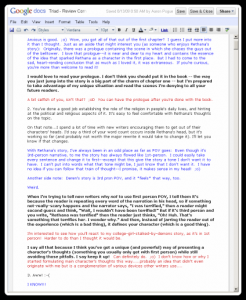
That conversation happened partly in GMail, but primarily in a Google Doc that I started and shared with her, “Triad – Review Comments.” As I read through her novel, I recorded my questions, comments, and emotional responses in plain text. She replied in red, often agonizingly answering, “Read and find out,” or just, “I know.”
Other comments she answered with questions, though, seeking clarification, or with explanation and insight into her writing process. I replied to those in bold and she responded in blue, back and forth, until my technicolor notes on her novel stretched to over 60,000 words.
I’ve used that image as an illustration before, and again here, because that boring little notepad in the cloud became the foundation on which amazing things have been built.
Share
As a writer, we all depend on our ability to share what we write. That’s why we must know how to build a platform, it’s why we must know how to get feedback and how to use feedback. It’s why we spend so much time, in so many ways, trying to improve our fundamentals — so that when a document finally reaches a reader, it works.
Making all that happen, though, is a tricky process. There are tools available — some new and some ancient — but my favorite tool (short of publication at Random House, anyway) is Google Docs.
I’ve talked before about the benefits Google Docs offers in the writing process, but the most significant by far is the ability to share — whether it’s with readers as a read-only manuscript or as a review copy for easy commenting, or with collaborators as a living, changing document supported by robust tools to manage multiple authors.
Sound like something you could use? It’s simple to get started, and completely free. All you’ve got to do is sign up.
Create new
First things first, you need to create a Google account.
Getting Started
If you already have a Gmail address, you’ve already got an account. If you’re interested in a free and reliable email service, you can sign up for a Gmail account at http://mail.google.com/ and use that username and password to access Google Docs.
If you’d prefer to set up an account with your existing email address, though, start out by going to http://docs.google.com/

The Google Docs login page
If I haven’t sold you on the value of the service (or adequately explained its offerings) you can find plenty of additional material on this page, including a video sales pitch. When you’re ready to set up your account, click the big blue Get Started button on the right side of the page.
Note: If you’ve already got a Gmail account, you can simply enter your Gmail address and password in the login form, and hit Sign In.
Creating Your Account
Google Docs is designed to work with an email address. Much of the power of Google Docs is its support for collaboration – allowing a document to be shared for viewing and editing among many Google Docs users. Collaboration requires communication, so Google requires every account be associated with an email address, rather than just a unique username.
In a way, that simplifies your account creation process. Just choose the email address you want to use as your point of contact for this account, and then provide a password.

Provide an email address and password to create your Google Docs account
After those two fields you’ll see a couple checkboxes. “Stay signed in” enables a pretty standard web cookie, but Enable Web History activates a custom tracking cookie that might be of more concern to you. If you’re concerned about that cookie (or just want to be on the safe side), you can easily uncheck that option without it having any negative consequences for your Google Docs account.
Before you can proceed, you’ll need to assert that you’re not a robot by entering the CAPTCHA text, and approve the End-User License Agreement.

Account creation requires you to enter a CAPTCHA and approve an EULA
Note that this license agreement gives Google permission to copy and retransmit any original works you create through Google Docs – a legal right they need in order to do the very things I’ve mentioned every time I’ve discussed the service (namely, let you create a document at work and then view it at home).
I don’t have any reason to suspect Google will abuse this right (and, as an author, I am comfortable authoring nearly all my creative work within Google Docs), but if you feel uncomfortable with the EULA you can walk away from Google Docs right here.
Either way, I encourage you to read through the (admittedly lengthy) EULA and decide for yourself what you’re willing to store on Google’s servers.
Verifying Your Account
If you’ve ever signed up for any internet service, ever, you already know what to do next. Google will send a verification email to the email address you provided.

Before you can begin, you have to verify that you are who you claim to be
Check your email, find the message from Google, and click the link provided. This verifies to them that you really are who you say you are, and allows you to access your Google Docs folder.

Your new Google Documents folder is ready to be filled up
Google Docs allows you to create folders to organize your documents, and it even uses some default folders to help you switch quickly among a list of documents that you created, a list of documents that other people shared with you, and a list of all your items. Initially, though, your folder is going to be completely empty.
Save and Close
Still, once you’ve got an account, you’re ready to go. You can make text documents, spreadsheets, presentations, and much more (just wait until you get into the custom templates). Next week I’ll take some time to tell you how to use Google Docs to improve your writing, but in the meantime poke around a little and see what you can do on your own.
It’s a remarkable tool, simple and powerful, and even if you don’t give up Word altogether, I suspect you’ll find places in your workflow for a Google Doc or two. If nothing else, it’s terribly handy for giving feedback — and making friends, if you use it right.

 A couple years ago I finally joined Facebook, hoping to track down some long-lost friends, and with one very sad exception, I’ve managed to do that.


 myself (see
  if you want to know more), so I’m not ever likely to pick any text apart until there’s nothing left of it. That said,
  ‘s
‘s  is one of those stories that makes me want to write about it and write about it, and then write about it some more, it touches me so deeply and so completely.


